
ONO SIM
Run the line before you build it, name the target, and let the optimiser find the cheapest way there, each suggestion with its payback. Runs in the browser.
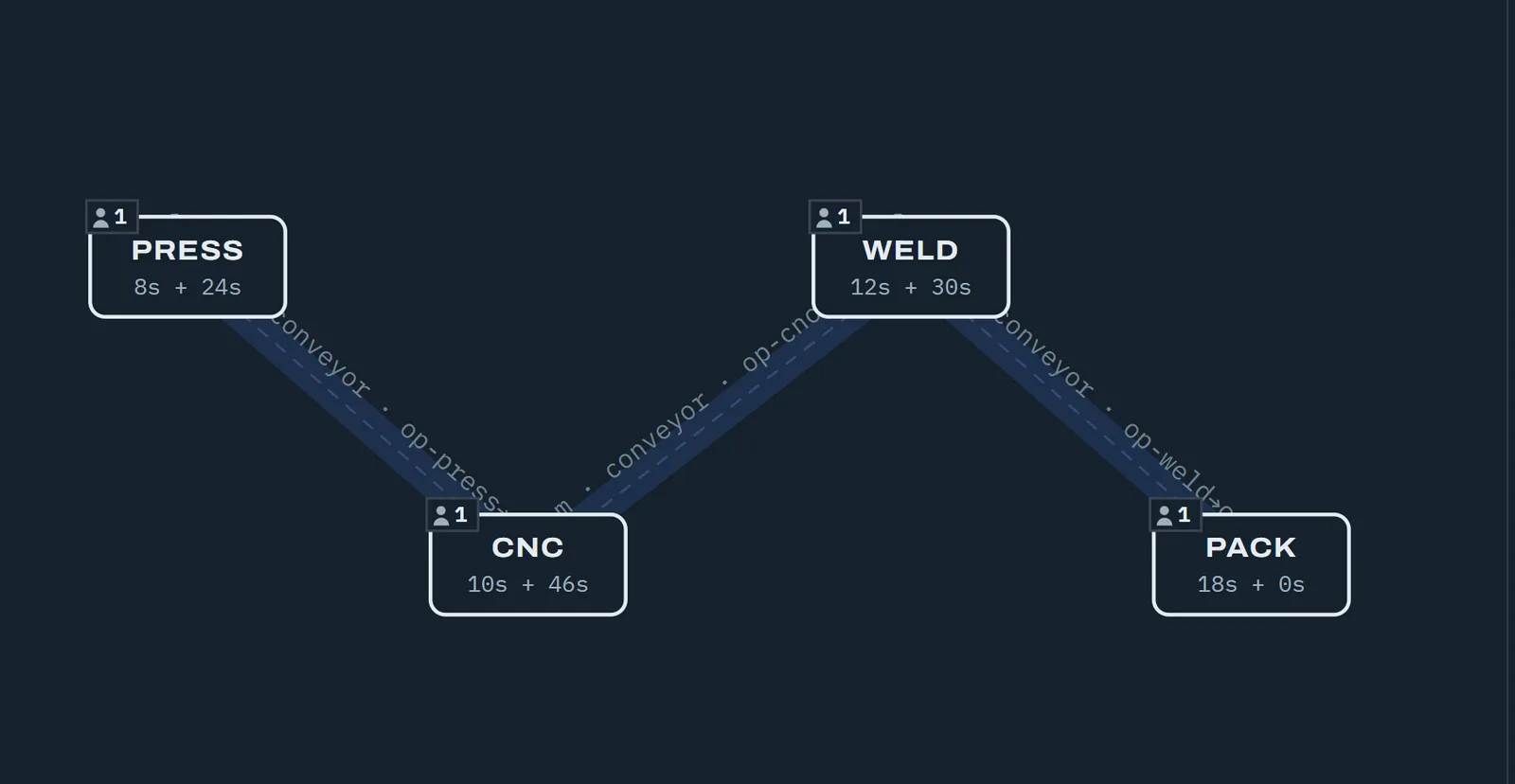
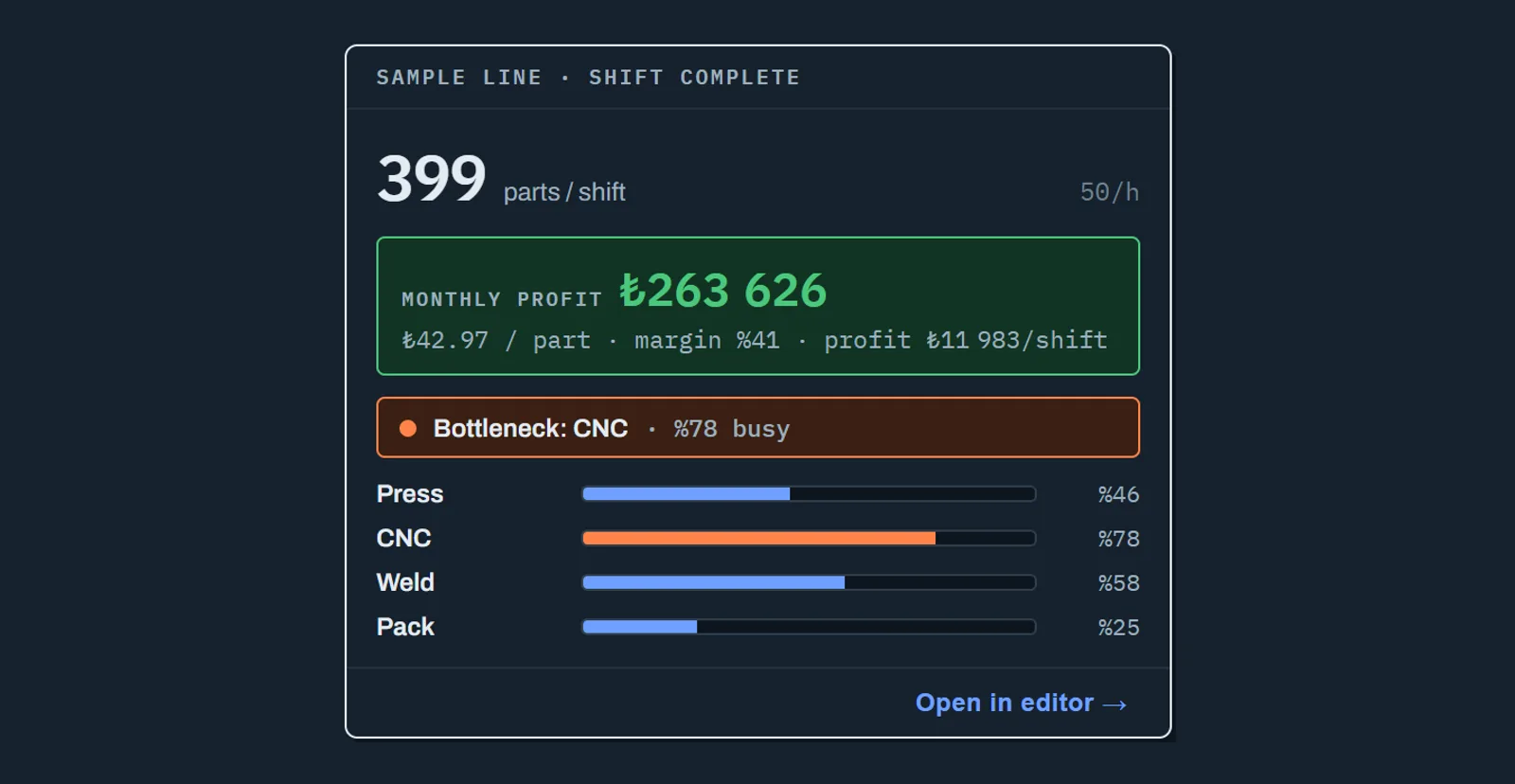
See it on screen
Producing more has a price. The optimiser lays the trade-off out row by row, with the capital and the payback next to every suggestion; one click applies the one you want.
ONO SIMWatch the placement search work: the line visibly settles as it improves.
ONO SIMAsk in plain language. The assistant reads the line, runs what it needs and answers with a measured comparison: today's line, the change, the capital it takes.
ONO SIMIn mixed production, cost splits per product: the part that holds the machine longer takes a larger share of the bill.
ONO SIMEvery visual in this section is a real screenshot of the running software; none of it is an illustration or a concept render.
Same order book: 6 presses or 9?
A representative injection plant: 18 moulds, 256,500 parts a week, presses of one class and one inspector per press. The week is 135 hours, three shifts a day, six days. The same book was spread over 6, 7, 8 and 9 presses and each plant was run in ONO SIM.
| Presses | People per shift | Orders | Week | Press utilisation |
|---|---|---|---|---|
| 6 presses | 8 | 91.9% 6 orders open | The week runs out, Saturday’s 3rd shift is used too | 98% |
| 7 presses | 9 | 99.2% 4 orders open | The week runs out, 4 orders stay open | 93% |
| 8 presses | 10 | 100% all delivered | Done in Saturday’s 3rd shift | 82% |
| 9 presses | 11 | 100% all delivered | Done in Friday’s 3rd shift, 3 shifts freed | 73% |
What the hours total hides
Counting hours says 7 presses are enough: 945 hours of capacity for 912 hours of work. In the simulation 99.2% of the book is delivered and 4 orders stay open, because a mould is tied to one press and cannot be split.
The 8th press saves the order book, the 9th frees Saturday.
A representative plant, not customer data. Moulds were spread over the presses for the most even load, each result measured over three replications. A shift is 7.5 hours.
Getting a quote for a machine is easy. Knowing whether that machine will pay for itself is the hard part. One more press, one more operator, or neither of those and simply a buffer in the right place? The answer depends on the whole line, not on the machine you are pricing. And finding out after the line is built is expensive.
ONO SIM builds your line on screen, runs a real shift through it, and reports the result in money. Cycle times, breakdowns, buffers, how far operators walk, conveyors, scrap; all of it is inside the model. What comes out is not just a part count: it is cost per part, profit per month, margin, and how many months the investment takes to return. And when you name a target, it searches for the cheapest way to reach it.
The Optimiser: You Name The Target, It Finds The Way
The usual way to use a simulator answers one question: “if the line is built like this, what does it produce?” You define a build, run it, read the number. Then you try another one. Ten attempts later you still cannot be sure you found the best.
ONO SIM’s optimiser turns that loop around. It searches the line’s design space itself: machine counts, buffer sizes, operators and crews, how parts are moved, the layout. It runs hundreds of builds and comes back not with one answer but with a list of trade-offs: what each step of producing more actually costs. Every row is a build with its cost per part and, next to it, the investment case. ”+₺1.2M to invest, pays back in ~10 months”, or plainly, “doesn’t pay back”. One click applies the row you want to the line.
Four questions you can ask it directly:
- Is there a better layout? Same machines, same headcount; only an arrangement that shortens transport and walking. It respects keep-out zones and the areas you define.
- Can less get the same result? A robot, or two operators? One more machine, or a buffer in the right place? The answer comes in money, and a robot is priced as capital, not as a wage.
- What does N parts a shift take? Type the target; get the cheapest build that reaches it and a concrete list of changes, such as “CNC ×2, +1 operator”. Sometimes the answer is fewer machines; it says so.
- What can this budget buy? Enter a capital and an operating budget; it finds the best line that stays inside them. If the budget is short, it does not say “impossible”, it tells you by how much.
To keep the search fast, every build is first scored with a quick estimate. When you apply a row, the line reruns that build at full simulation fidelity; every number the optimiser reports ends up confirmed by a real shift run.
What It Does
- Optimisation that looks for the cheapest way to your target and lists every suggestion with its capital cost and payback period
- Placement search that lays machines out for the shortest transport and walking time, respecting keep-out zones and the areas you define
- Run a shift and see what the line actually produces: the bottleneck machine, utilisation for every machine and operator, blocked and starved time
- Results in money: cost per part, profit per shift and per month, margin, capital required, payback period
- Compare scenarios side by side and apply the one you want to the line in a single click
- Ask in plain language, “how is my line doing?”, “what should I improve first?”, and every answer comes from a run that actually happened
- Nothing to install: it runs in the browser, in Turkish and English
Uncertainty Is Part Of The Model
A real line does not produce the same number every shift. Cycle times vary, machines break, a part is scrapped, an operator walks between two presses. A single deterministic calculation does not describe that world; it gives you the average and hides the risk.
ONO SIM is a discrete-event simulator and every measurement runs several replications. Inside the model:
- Cycle-time variability, with loading and automatic running time defined separately
- Breakdowns and repairs (MTBF/MTTR), including time spent waiting for a maintenance technician
- First-pass yield: scrap leaves the line, so effective throughput drops the way it really does
- Buffers, blocking and starving
- Product mix and mould changeovers, run as campaigns or mixed
- Operators, crews and real walking distances; conveyors and manual carry
- A floor plan in metres: import your own layout as DXF or as an image
It Answers With A Decision, Not A Number
Numbers on their own do not mean much. What matters is which decision the number changes.
So every result in ONO SIM ties back to one: which machine is the bottleneck, what happens if you add another, how many months until it pays for itself, whether the same money is better spent on an operator. When a row in the comparison table is the one you want, one click applies it, and the line becomes that scenario.
You can ask the line assistant in plain language. Every answer it gives comes from a simulation that was genuinely run: the assistant does not offer opinions, it reports measurements.
Who It Is For
- Building a new line: test machine count, headcount and layout before any concrete is poured
- Improving an existing line: measure the bottleneck instead of guessing it, and see what the fix is worth in money
- Preparing quotations: put a model behind the capacity you promise a customer
- Making the investment case: have the answer to “how long until this machine pays for itself” ready in the presentation
Your Excel is enough, and you can start without buying software
StudyWe measure your question
We build your plant from your machine and mould lists, check it against your current week and measure your questions. You get a report and a presentation. No installation, no licence.
LicenceYour team tries it themselves
ONO SIM runs in the browser. Your engineers build their own lines, compare scenarios and apply the one they like.
The steps of a study
- Data
Machine and mould lists, times, the order book, the shift calendar and the floor plan.
- Model
Checked against your current week. Whatever does not match is fixed first.
- Scenarios
People, investment, layout and calendar questions run on the same yardstick.
- Decision
A report and a presentation. On request the model moves on to Visual Components.
One question is enough to start: headcount, an investment, the layout or the calendar.
GET A QUOTE